SeeBloom
SeeBloom / Models / Runway Gen-4.5
AI Video Model

Runway Gen-4.5 AI Video Generator — Cinematic Camera Control

Generate polished 2–10 second shots with precise camera language and instruction following. Use Gen-4.5 for hero takes, or Gen-4 Turbo when you need cheaper image-to-video drafts.

30 free credits on sign-up · Failed jobs refunded

Runway Gen-4.5 at a glance

What you can set for each generation on SeeBloom.

Clip length
Gen-4.5: 2–10s · Gen-4 Turbo: 5s / 10s
Resolution
Studio Standard tier (720p placeholder)
Aspect ratio
16:9, 9:16, 1:1, 4:3, 3:4, 21:9
Inputs
Text-to-video · single-image image-to-video (Turbo: i2v only)
Price on SeeBloom
Gen-4.5 5 credits/s · Gen-4 Turbo 2 credits/s

Why creators choose Runway Gen-4.5

Where the model stands out compared with other video generators.

Camera instruction following

Describe orbits, crane moves and one-takes — Gen-4.5 stays faithful to cinematic direction.

Text and image workflows

Start from a prompt or a single clean still for image-to-video.

Turbo for drafts

Switch to Gen-4 Turbo at 2 credits/s for rapid image-to-video iteration before a Gen-4.5 finish.

Wide aspect set

Cover social verticals, cinematic wides and square formats in one studio.

Runway Gen-4.5 prompt examples

Copy a prompt, open the studio and paste it in — then adjust the subject and details to make it yours.

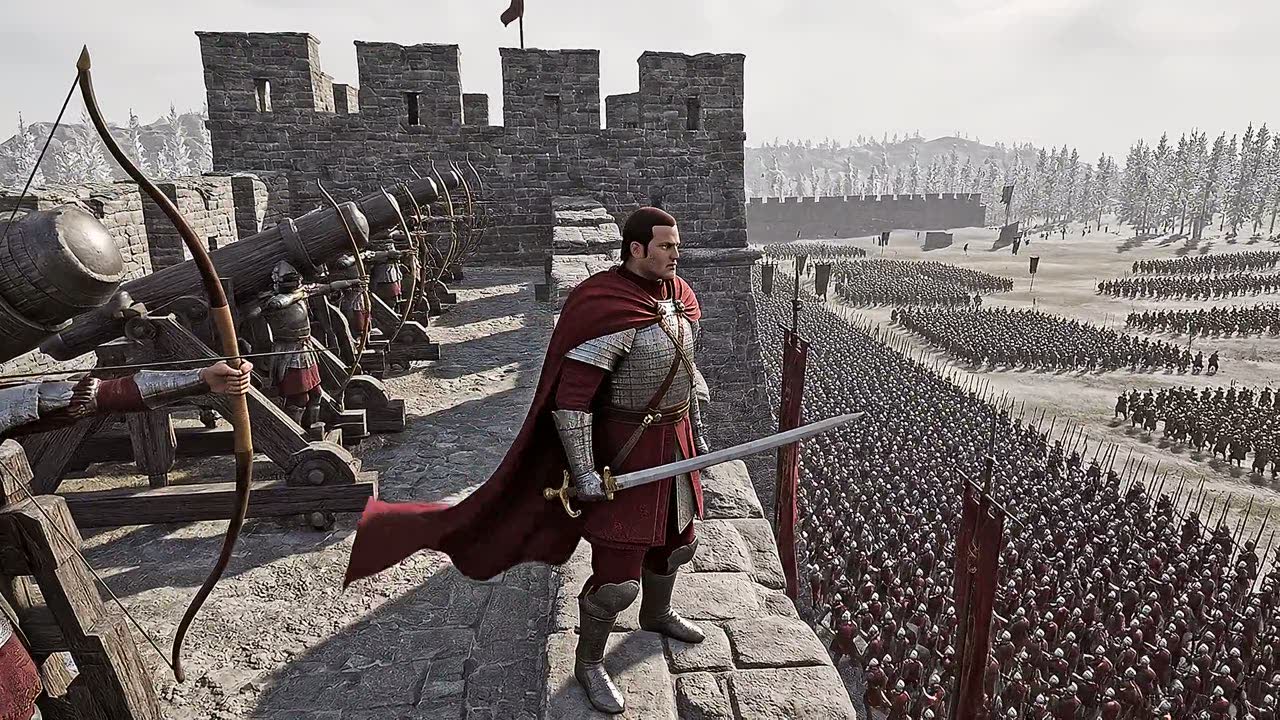
Siege one-take
8s · Standard · 16:9

Siege one-take

Epic siege one-take: camera skims low over a vast army massed below the walls, red-and-gold banners snapping, then glides up the weathered stone wall, clears the battlements and settles beside a general in a crimson cape gripping a longsword; archers at full draw and a row of cannons beside him, endless formations across the snowy plain. Smooth continuous camera, no cuts, stable faces and armor, cinematic realism, no text, no watermark.
Try it
Prompt idea · text-to-video

Cinematic camera language

Epic siege one-take: camera skims low over a vast army below the walls, red-and-gold banners snapping, then glides up the weathered stone wall and settles beside a general in a crimson cape. Smooth continuous camera, cinematic realism, no text, no watermark.
Try it

How to make a Runway Gen-4.5 video

Three steps, no software to install.

1

Choose Gen-4.5 or Turbo

Use Gen-4.5 for quality; Turbo for cheaper image-to-video drafts (still required).

2

Describe the shot

Write camera path, lighting and subject action. For i2v, upload one clean first frame.

3

Generate and download

Pick duration and aspect, then download the MP4 when ready.

Runway Gen-4.5 pricing

Runway Gen-4.5 Standard is billed at 5 credits/s (about $0.25/s). Gen-4 Turbo is 2 credits/s (about $0.10/s) at the base rate (20 credits = $1).

ExampleRateTotal
8s · Gen-4.55 credits/s40 credits
10s · Gen-4.55 credits/s50 credits
10s · Gen-4 Turbo2 credits/s20 credits

Studio currently exposes the Standard output tier. Failed generations are refunded automatically.

Frequently asked questions

About Runway Gen-4.5 on SeeBloom.

What is Runway Gen-4.5?

Gen-4.5 is Runway’s flagship video model for cinematic text-to-video and image-to-video with strong instruction following.

How is Gen-4 Turbo different?

Turbo is a faster, cheaper image-to-video path at 2 credits/s, fixed at 5s or 10s. It does not support text-only generation.

Does SeeBloom support Runway video editing?

Not in Studio yet. For natural-language video edit, use Grok Imagine or Gemini Omni Fast.

Can I try it for free?

New accounts get 30 free credits — enough for a short Gen-4.5 clip at 5 credits/s.

Is SeeBloom affiliated with Runway?

No. SeeBloom is an independent platform providing access to Runway models alongside others.

Start creating with Runway Gen-4.5

Sign up to get free credits and generate your first clip in minutes.

Open Runway Gen-4.5 in SeeBloom →